
What players say
Cosmic Drift Navigator succeeds as a straightforward browser arcade game by focusing on tight controls and clear objectives. The energy orb system adds a layer of strategy to what could be a simple shooter, encouraging players to learn arena layouts. The difficulty curve feels natural, with early stages teaching fundamentals before later arenas test your reflexes. The competitive score comparison provides motivation for repeated attempts. While it lacks deep customization or multiplayer, the core loop remains engaging for short sessions. It is a solid choice for fans of classic arcade action who want a no-fuss experience.
About this game
Core Navigation Mechanics
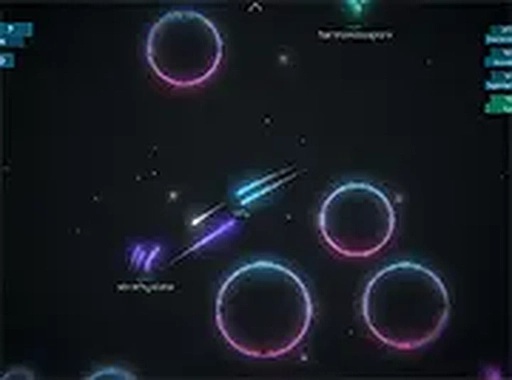
Cosmic Drift Navigator places you at the controls of a compact spacecraft moving through a series of colorful cosmic arenas. The primary action involves steering your vessel using the arrow keys or WASD, while aiming and firing with the mouse. The environment is filled with drifting energy orbs that, when collected, temporarily boost your ship's speed or defensive capabilities. The game's challenge comes from balancing movement, collection, and evasion of hostile ships that patrol each area.
Energy Orb System
Scattered throughout each arena are glowing orbs that serve as the main resource for upgrading your ship on the fly. Picking up these orbs can increase your fire rate, grant a short speed burst, or provide a protective barrier. The orbs appear in set patterns, encouraging players to learn their locations and plan efficient routes. Strategic collection becomes essential as later arenas introduce more aggressive opponents that require constant movement.
Competitive Arena Design
Each arena is a self-contained space with distinct visual themes and obstacle layouts. Some areas feature tight corridors formed by asteroid fields, while others offer open expanses with multiple enemy spawn points. The game includes a competitive mode where you can compare your performance against AI-controlled pilots or other players' saved scores. The arenas are designed to reward quick reflexes and spatial awareness.
Controls and Accessibility
The game is optimized for desktop computers, requiring only a standard keyboard and mouse. Movement is handled by the keyboard, while aiming and shooting use the mouse cursor, allowing for precise targeting. A full-screen toggle is available to remove browser distractions and improve visibility. The control scheme is responsive and requires no additional software or plugins to run.
Progression and Difficulty Curve
As you advance through the arenas, the frequency and variety of enemy ships increase. Early stages serve as a tutorial for basic movement and orb collection, while later stages introduce faster enemies and more complex orb patterns. The difficulty ramps gradually, giving players time to develop their navigation strategies. There is no set endpoint, encouraging repeated play to achieve higher scores and unlock new arena layouts.






Player Comments
Sign in to comment
You must be logged in before posting a review or rating.
No account? Create one
No comments yet. Be the first to comment!